

AI workflows are easy to demo. Production AI workflows are much harder.
A demo only needs to work once. A real workflow has to handle malformed model responses, API failures, duplicate events, rate limits, worker crashes, partial execution, and actions that cannot simply be undone.
The key principle is simple:
Treat AI as a probabilistic component inside a deterministic system.
AI can reason, classify, summarize, and recommend actions. Your application should control permissions, workflow state, validation, retries, and execution. That’s how you move from an impressive demo to AI automation that businesses can actually rely on.
1. Separate AI Decisions From Workflow Control
One of the biggest mistakes in AI architecture is letting the model control too much. Consider: new lead → analyze → create CRM record → send email → create task. The AI can help determine what should happen. It shouldn’t independently control everything around it.
Let the AI handle: classification, extraction, summarization, recommendations, content generation, context-dependent decisions.
Keep deterministic systems responsible for: permissions, business rules, workflow state, retries, timeouts, rate limits, idempotency, approval requirements, audit logging.
An AI model can recommend: “This lead is high priority.” The application decides whether that result is valid and whether any action is permitted.
2. Use Structured Inputs and Outputs
Don’t build workflows that depend on parsing arbitrary AI-generated text. Instead of:
{ "response": "This looks like a high-priority lead." }
use a defined structure:
{
  "classification": "high",
  "reason": "Strong fit and recent buying activity",
  "recommended_action": "sales_followup"
}
Structured outputs give your application something predictable to validate. OpenAI, for example, supports JSON Schema-based Structured Outputs for compatible API workflows. But schema adherence guarantees shape, not truth or business correctness. You still need to validate the values against your own rules and source data.
3. Validate Before Taking Action
Think about validation in layers:
- Schema validation — Is the response structured correctly?
- Type validation — Are the values valid?
- Business validation — Does the action make sense?
- Permission validation — Is the action allowed?
- Risk validation — Does it require approval?
An AI response can be perfectly formatted and still be wrong. Never allow a model response to directly trigger an important external action without validation.
4. Make Important Actions Idempotent
Imagine your workflow sends an email. The provider receives it, but your application times out before receiving confirmation. If you blindly retry, the customer may receive the same email twice. This applies to emails, payments, CRM updates, messages, webhooks, and task creation.
Use an idempotency key for each logical action:
workflow_id: wf_82931
action: send_followup
idempotency_key: wf_82931:send_followup
Before executing, check whether that action has already completed. Store the result against the same key so a retry can return the prior outcome instead of repeating the side effect. AWS’s guidance on making retries safe with idempotent APIs describes this request-token pattern and the edge cases around duplicate requests.
5. Use Queues, Concurrency Limits, and Backpressure
What happens if one customer triggers 50,000 AI tasks? Without controls, your infrastructure may hit rate limits, overload dependencies, and create cascading failures. Instead of triggering execution immediately, route work through a queue:
Trigger → Queue → Worker → Execute
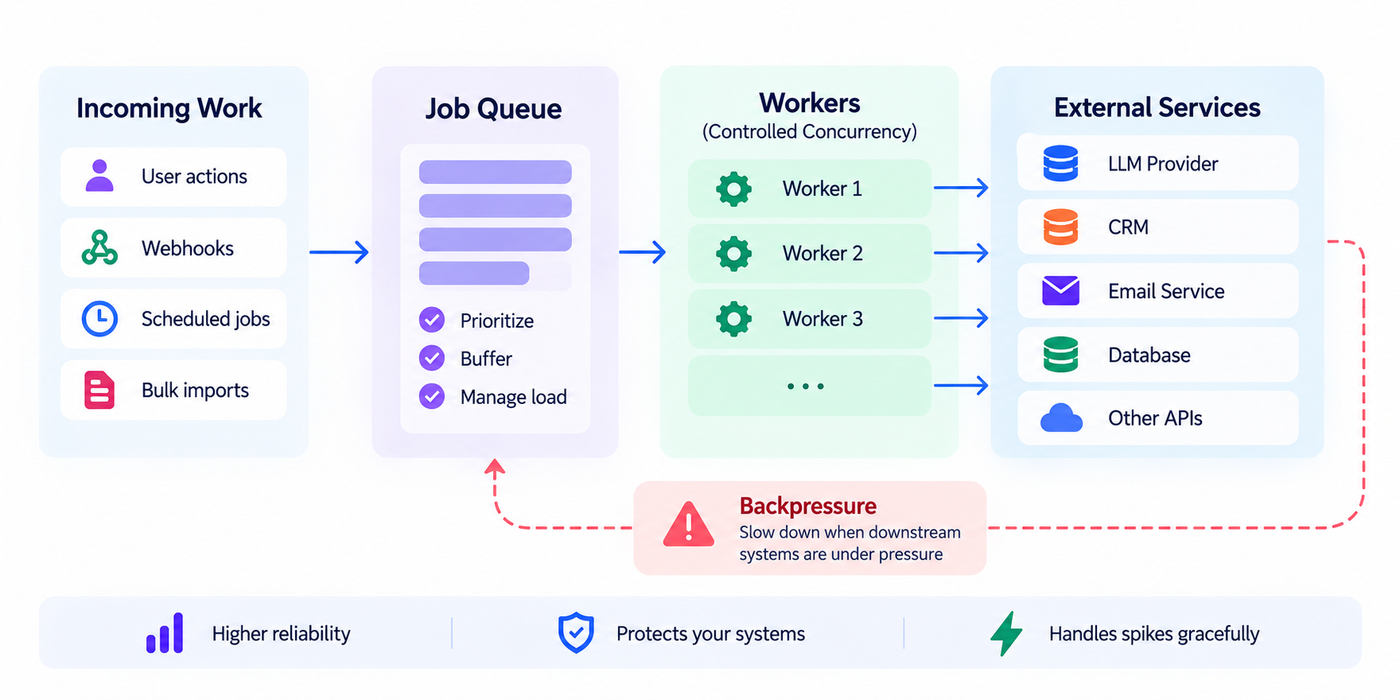
Workers should have controlled concurrency based on the systems they depend on:
AI workers:       20 concurrent
CRM API:           5 concurrent
Email API:        10 concurrent
Queues absorb bursts of work. Concurrency limits prevent one workload from overwhelming the entire system. Backpressure ensures producers or consumers slow down when downstream services cannot keep up. AWS’s guidance on avoiding insurmountable queue backlogs explains why queue age, arrival rate, processing rate, and recovery capacity matter—not merely queue depth.
6. Retry Intelligently
Not every failure deserves another attempt. A timeout or temporary service outage may recover. An invalid request probably won’t.
- Timeout — Response: Retry
- Rate limit — Response: Wait and retry
- Temporary outage — Response: Retry with backoff
- Invalid request — Response: Fail
- Permission denied — Response: Escalate
- Policy violation — Response: Do not retry
For recoverable failures, use bounded exponential backoff, ideally with jitter:
Attempt 1 → Wait 1 second
Attempt 2 → Wait 2 seconds
Attempt 3 → Wait 4 seconds
Attempt 4 → Wait 8 seconds
AWS recommends limiting retries and using exponential backoff with jitter where appropriate. Retry at one deliberate layer rather than at every layer of a call chain, or a small downstream failure can become a retry storm.
7. Use Timeouts, Fallbacks, and Circuit Breakers
Every external dependency should have a timeout. A workflow should never wait indefinitely for an AI model, a CRM, an API, a database, or an email provider.
Where appropriate, use fallbacks — preferred model unavailable, use an approved fallback model; external research unavailable, continue with existing customer data.
For repeatedly failing services, use a circuit breaker:
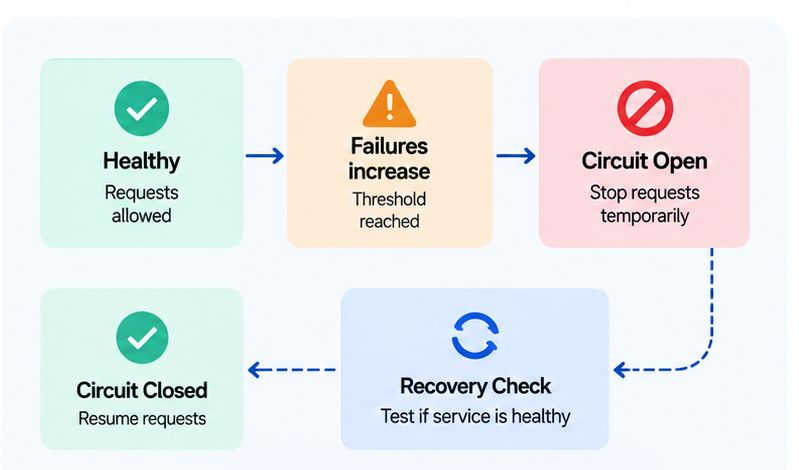
This prevents thousands of workflows from repeatedly hitting a dependency that’s already failing.
A production circuit breaker normally moves through closed, open, and half-open states. After a cooldown, allow a limited probe in the half-open state. Close the circuit only after the dependency demonstrates recovery; reopen it if the probe fails.
8. Add Human Review Where Risk Demands It
Not every action should be autonomous. Large financial transactions, deleting important records, sensitive customer communications, employment decisions, permission changes, and large campaign launches are all candidates for approval.
A strong pattern: AI proposes → System validates → Human approves → System executes.
AI autonomy should be based on risk, not novelty. If a simple automation can safely handle a task, don’t introduce an agent just because you can.
9. Persist State for Long-Running Workflows
Some workflows take seconds. Others take days. For long-running workflows, you need persistent state — track the current step, completed and failed actions, retry count, pending approvals, relevant IDs, and the next scheduled action.
If a worker crashes halfway through, the workflow should resume safely. It should not restart from the beginning and repeat completed actions. This is where state machines or durable workflow systems become useful.
When retry budgets are exhausted, move the work to a dead-letter or failed-work queue with enough context for diagnosis and replay. Partial workflows also need a reconciliation or compensation strategy. If a CRM record was created but the follow-up task failed, the system should resume the missing step or deliberately reverse the earlier change—not silently leave inconsistent state.
10. Make Every Workflow Traceable
When something fails, “the AI didn’t work” isn’t useful information. You should be able to reconstruct the entire execution: trigger → workflow → model → tool → API → retry → approval → action.
Use identifiers such as workflow_id, execution_id, trace_id, and step_id. OpenTelemetry context propagation is designed to correlate traces, logs, and metrics across process and service boundaries.
You should also maintain an audit trail for important actions: who initiated the workflow, which model and prompt version were used, which tools were called, what action was proposed versus actually executed, who approved it, and when it happened.
11. Version Prompts, Models, and Schemas
AI workflows change over time. A small prompt change can alter behaviour. A model update can affect output. A tool schema can break an existing workflow. Track versions for prompts, models, tool definitions, output schemas, and evaluation criteria:
workflow: lead_qualification
prompt_version: 12
model_version: production-model
schema_version: 4
When reliability changes, you’ll know exactly what configuration produced the result.
12. Test Failure and Recovery Paths
Testing the happy path isn’t enough. Test what happens when the model returns invalid output, a tool fails, an API times out, a rate limit is reached, the same event arrives twice, a worker crashes, retries are exhausted, a human rejects an action, or a workflow partially completes.
The most important question: can the workflow recover without repeating completed actions? Reliable systems don’t just know how to succeed. They know how to fail safely and recover.
A Reference Architecture for Reliable AI Automation
A reliable AI automation can be structured into these layers:
- Trigger — user action, schedule, webhook, or external event.
- Workflow Engine — controls state, rules, permissions, and orchestration.
- Queue — manages concurrency, prioritization, retries, and backpressure.
- AI and Tools — models analyze context and interact with approved systems.
- Validation and Safety — schema checks, business rules, permissions, and risk controls.
- Execution — actions are performed through controlled, idempotent operations.
- Observability — logs, traces, metrics, alerts, and audit records capture what happened.
Not every workflow needs all seven layers at full weight. A low-volume, low-risk automation might not need a dedicated queue, and a fully reversible action might not need a human-approval gate. Scale the layers to the risk and volume of the task, not the other way around.
The key separation is this: AI can decide what should happen. The system controls what is allowed to happen. That distinction is at the heart of reliable AI workflows — it’s the same one built into Spark’s own automation layer, where every AI-proposed action still passes through validation before it touches a CRM record or sends a message on a customer’s behalf.
The Bottom Line
Building an AI workflow that works once is easy. Building one that works under load, survives API failures, handles duplicate events, recovers from crashes, and avoids unsafe actions requires proper engineering. The essentials:
- Keep deterministic workflow control separate from AI reasoning.
- Use structured inputs and outputs.
- Validate before executing.
- Make side effects idempotent.
- Use queues and concurrency limits.
- Retry only failures that can recover.
- Add timeouts, fallbacks, and circuit breakers.
- Require human approval for high-risk actions.
- Persist workflow state.
- Build tracing and auditability from the beginning.
- Version prompts, models, and schemas.
- Test recovery, not just success.
The goal isn’t to eliminate every failure. That’s impossible. The goal is to make failures contained, visible, recoverable, and safe. That’s what turns AI automation from a demo into dependable business infrastructure.